Skip to content
Search
Discount sale

How to Implement "Buy One Get One Free (BOGO)" on Shopify | The Most Powerful Strategy to Double Your Sales

Are you struggling with attracting customers to your Shopify store or clearing out old inventory? There is a "magic phrase" that grabs customers' hearts much more effectively than a simple "◯% OFF" or "50% off the second item."

That phrase is: "Buy one, get another one free."

In Western markets, this is known as "BOGO (Buy One Get One Free)" and is recognized as one of the most effective types of promotions.

In this article, we will explain how to easily implement this high-impact "Buy One Get One Free" strategy using the Shopify app "RuffRuff Order Bonus."

What is "Buy One Get One Free (BOGO)"?

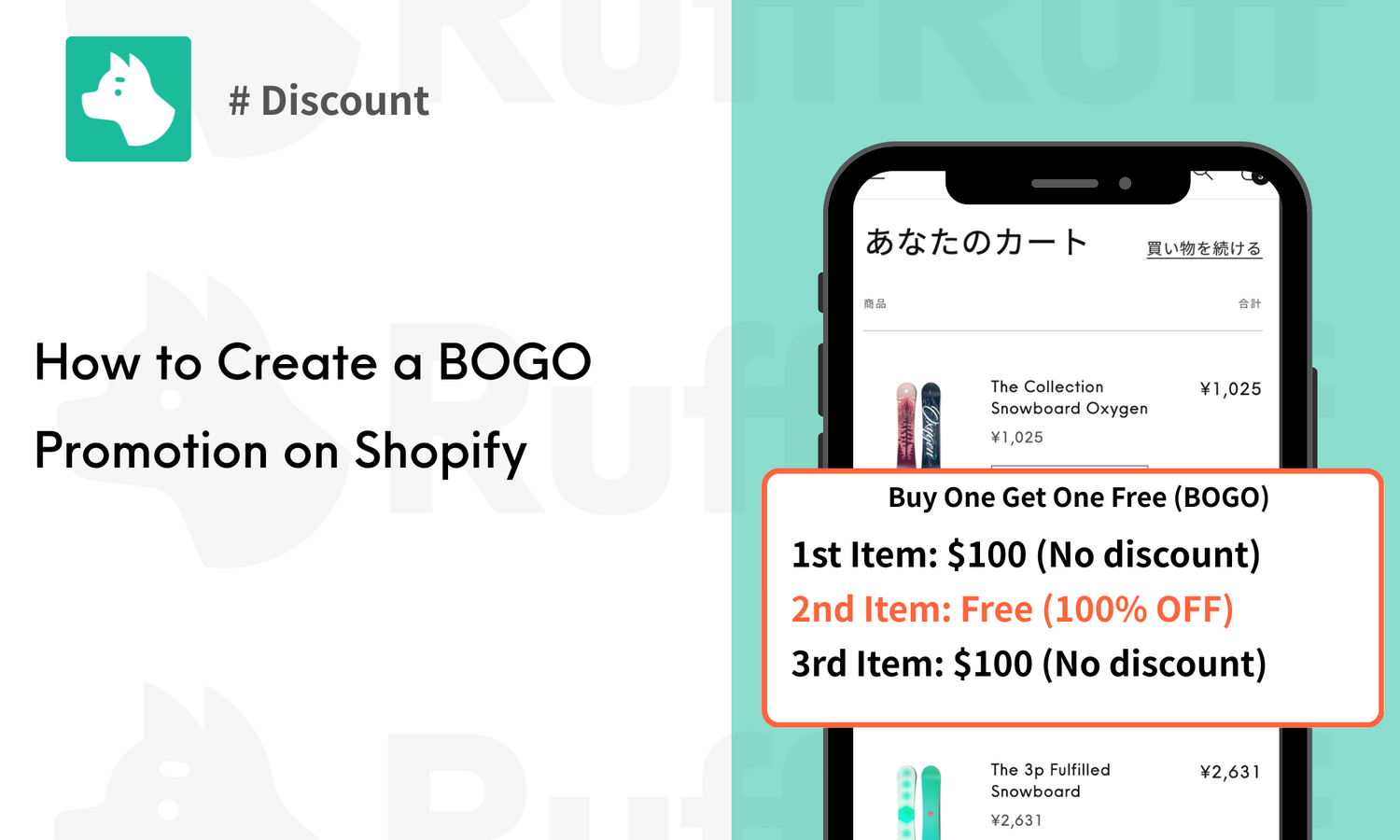
"Buy One Get One Free (BOGO)" is exactly what the name implies: a promotion where "if you buy one product, another one becomes free." While the actual discount rate is the same as "selling two items at 50% OFF," the impression it gives customers is entirely different.

In behavioral economics, the word "Free" is considered the strongest psychological trigger. Being able to "get it for free" increases a customer's purchase intent much more than "paying half price."

▼ Recommended for these scenarios:

  • End-of-season inventory clearance: When you want to clear summer or winter items you don't want to carry over to next year, while still securing profit (the list price of one item).
  • Awareness for new products: When you want to spread word-of-mouth by encouraging customers to "keep one for yourself and give the other to a friend."
  • Consumables and set items: Promoting bulk purchases for items people always need more of, such as skincare, supplements, or socks.

Shopify App Capable of BOGO Settings RuffRuff Order Bonus

RuffRuff Order Bonus is a Shopify app that allows you to easily implement Discount campaigns and gift distribution strategies based on various conditions.

  • Flexible Application Methods: Choose from automatic or manual application. You can set effective discounts for various situations.
  • Diverse Discount Options: You can configure three types: Product discount, Order discount, and Shipping discount. Using these in combination allows for efficient promotion.
  • Advanced Discount Features: By utilizing features like Maximum discount amount and Rounding adjustment, you can deploy flexible discount strategies.

By using RuffRuff Order Bonus, you can offer attractive deals to customers and contribute to increasing sales. Strengthen your store's marketing through various strategies.

How to Hold a "Buy One Get One Free" Campaign on Shopify

By following the settings in this chapter, the behavior in the Cart will change based on the quantity of Eligible items as follows:

  • 1 item → List price
  • 2 items → 1 item free (BOGO achieved)

There is also a demo product where you can check the actual operation.

Preparation: App Setup

In this article, we use the Shopify app "RuffRuff Order Bonus." If you haven't installed it yet, please do so.

(1) From the Setup guide on the app's top page, click "Enable app embed in your live theme."

(2) Select the Shopify theme where you want to install the app from the select box.

(3) Click "Enable app."

(4) Enable "RuffRuff Order Bonus" on the left side of the Theme editor screen.

(5) Click "Save" in the upper right corner.

Step 1: Create a Discount Campaign

(1) Select "Dashboard" (or Campaign list) from the left menu of the app.

(2) Click "Create campaign."

(3) Configure the following in the Campaign overview:

  • Campaign name: Internal use (e.g., Inventory Clearance BOGO Sale)
  • Discount title: Coupon code displayed to customers (e.g., "Buy 1 Get 1 Free" or "FREE-ITEM")

(4) Set the period you want to run the discount in Active dates.

(5) In the Discount settings, click "Add discount" and select "Product discount."

(6) Configure the following for the Product discount:

  • Select "Percentage" and enter "100."
  • In "Applies to," set the product you want to offer as BOGO.
  • Check "Limit application range."
  • Enter "2" for the Start position.
  • Enter "2" for the End position.

*By entering "2" in both, only the second item will be eligible for the free discount.

(7) Click "Save."

Step 2: (Optional) Configure Campaign Display Information

By following the settings in this section, you can display information like "Add 1 more for 50% off" within the Widget on your Online store. If not needed, skip to Step 3.

(1) Click "Display settings" for the Discount campaign created in Step 1.

(2) In Display position, enter the order you want it to appear in the Widget. Items are displayed in ascending order of the number.

(3) Enter the name in Campaign title.

(4) Enter detailed information in Campaign description.

(5) Click "Save."

Step 3: Activate the Discount Campaign

(1) Open the Discount campaign created in Step 1.

(2) Click "Activate."

The setup is now complete.

Conclusion

In this article, we introduced the steps to implement "Buy One Get One Free (BOGO)" on Shopify.

The word "Free" is more powerful than "Half Price"; it stops customers in their tracks and strongly encourages them to add items to their Cart. With "RuffRuff Order Bonus," you can start this promotion—which usually requires complex calculations—in just a few minutes.

When you want to clear inventory or rapidly increase your Average Order Value, be sure to incorporate this BOGO strategy.

ディスアカウントの関連記事

View all

How to Implement "Buy One Get One Free (BOGO)" on Shopify | The Most Powerful Strategy to Double Your Sales

Learn how to hold the popular "BOGO (Buy One Get One Free)" strategy on Shopify. It is highly effective for inventory clearance and increasing AOV. Using the app "RuffRuff Order Bonus," you can eas...

How to Set Up "Half Price for the 2nd Item and Beyond" in Shopify

The following also explains how to hold a "Half price for the 2nd item and beyond (2nd item 50% OFF)" sale in Shopify. By continuing the discount for the 3rd item and beyond, you can aim to boost y...

Shopifyでの最大割引額設定ガイド:利益を守りながらディスカウントを実現する方法

Shopifyでの最大割引額設定ガイド:利益を守りながらディスカウントを実現する方法

Shopifyの最大割引額設定方法を解説。効果的なディスカウント施策を通じて顧客の購入意欲を高め、利益を維持するための具体的なステップを紹介します。

Shopifyで割引後価格の端数調整

Shopifyで割引後価格の端数調整(切り捨て・切り上げ)する方法|ディスカウント応用編

Shopifyでの割引後価格の端数調整方法を解説します。本記事では、切り捨て、切り上げ、四捨五入の手法を用いた端数処理と、特定のShopifyアプリを活用した効果的なディスカウント戦略を紹介します。顧客の利便性を向上させるための方法を学び、オンラインストアの競争力を高めましょう。

Shopifyで会員ランク別にサブスク商品のディスカウントを設定する方法

Shopifyで会員ランク別にサブスク商品のディスカウントを設定する方法

Shopify Subscriptionで会員ランク別にサブスク価格を変動させる方法を解説。RuffRuff 購入特典アプリを使い、顧客タグによってノーマル・シルバー(5%OFF)・ゴールド(10%OFF)の3段階の割引を自動適用する設定手順を画像付きで紹介します。

Shopifyで会員限定にタイムセールを実施する方法

Shopifyで会員限定にタイムセールを実施する方法

Shopifyで会員限定タイムセールを実施する方法を解説。RuffRuff 購入特典アプリを使用してログインユーザーのみに割引を適用する手順を、画像付きで詳しく説明します。

ブログ拡張の関連記事

View all

How to Display Shopify Tag Lists by Language | Show Japanese and English Tags Separately Using an App

Learn how to display tag lists on Shopify collection pages by language. This guide provides step-by-step instructions with screenshots on using the RuffRuff Product & Blog Tags app (Regular Pla...

Shopifyでタグ一覧やタグ絞り込み機能を導入する方法

Shopifyでタグ一覧やタグ絞り込み機能を導入する方法

Shopifyでのタグ一覧表示と絞り込み機能の実装方法を解説。テーマ機能、アプリ導入、コードカスタマイズの3つのアプローチから、ストアに最適な方法を選べます。RuffRuff タグ一覧アプリを使った具体的な設定手順も詳しく紹介。商品やブログの整理に役立つタグ機能を、プログラミング知識不要で導入できます。

【2025】Shopifyのタグ一覧アプリを徹底比較|表示位置やタグ絞り込み(タグフィルター)機能など

【2025】Shopifyのタグ一覧アプリを徹底比較|表示位置やタグ絞り込み(タグフィルター)機能など

Shopifyストアのタグ管理を効率化!「RuffRuff タグ一覧」「シンプルブログタグ絞り込み」「クイックタグ検索」の3つのアプリを徹底比較。料金、機能、導入のしやすさから最適なタグ一覧アプリを選択するためのガイド。

【2025】Shopifyアプリでブログ記事に目次を表示する方法

How to Display a Table of Contents in Blog Posts Using Free Shopify Apps

Learn three methods to display a table of contents in Shopify blog posts (source code customization, app usage, theme usage). Step-by-step instructions focus on setup using the free app RuffRuff Ta...

【2025】Shopifyのブログ記事に著者プロフィールを表示する方法

How to Display Author Information on Shopify Blog Posts

How to Display Author Information on Shopify Blogs: A Comprehensive Guide! We compare three methods - standard features, source code customization, and app integration - to help you find the optima...

購入制限の関連記事

View all
【2025年最新】Shopifyで金額制限|おすすめ購入制限アプリも紹介

Shopify Price Limits | Recommended Order Limits Apps

Learn how to easily set amount restrictions for specific products or collections using Shopify's RuffRuff Order Limit app. Improve customer satisfaction and maximize sales by implementing minimum a...

【2026最新】Shopifyで同梱制御の実現方法|同梱制限に役立つShopifyアプリと設定手順も解説

How to Set Up Bundling Restrictions in Shopify

Learn how to manage product bundle restrictions in your Shopify store with RuffRuff Order Limits app. Follow our step-by-step guide to set up and configure bundle controls for better inventory and ...

Shopifyで単品購入不可の設定を実施する方法|セットでないと購入不可

【2026最新】Shopifyで単品購入不可の設定を実施する方法

Shopifyで特定の商品を単品購入不可にする方法を解説。RuffRuff 注文制限を使った同梱制限の手順を詳しく紹介し、顧客の意図しない購入を防ぐための対策を提案します。ビジネスに役立つ柔軟な販売手法を学びましょう。

【2026最新】Shopifyで個数制限の実施方法!数量を基準に購入制限

How to Set Up Quantity Limits Using Shopify Apps

Learn how to set up and manage product quantity limits in your Shopify store using RuffRuff Order Limits app. This comprehensive guide covers installation, configuration, various limit types, and t...

Shopifyで条件によって代金引換を非表示にする方法|決済非表示アプリも紹介

How to Hide Cash on Delivery Option on Shopify

How to Hide Cash on Delivery (COD) for Specific Products on Shopify. This article introduces specific steps for flexibly controlling payment methods using the RuffRuff Order Limits app, with condit...

Shopifyで配送制限の実施方法|重量が30kg以上でローカルデリバリーを非表示

Shopifyで配送制限の実施方法|重量が30kg以上でローカルデリバリーを非表示

Shopifyでの配送制限を実施する方法とそのメリットを解説。顧客満足度の向上やリスク管理、マーケティング戦略の最適化について具体的なユースケースを交えながら紹介します。ビジネスに役立つ配送制限の設定方法を学びましょう。

販売期間設定の関連記事

View all
Shopifyで期間限定販売を実施する方法|販売期間設定アプリも紹介

【2026最新】Shopifyで期間限定販売を実施する方法|販売期間設定アプリも紹介

Shopifyでの期間限定販売の設定方法とおすすめアプリを詳しく解説します。短期間での売り上げアップを図るための戦略を学びましょう!

【2026最新】Shopifyで発売予告を実施する方法|発売予告アプリも紹介

How to Announce Upcoming Product Releases on Shopify Using RuffRuff Selling Periods: A Complete Setup Guide

Learn how to effectively announce upcoming product releases on your Shopify store with RuffRuff Selling Periods. This guide covers everything from app installation to setup, helping you boost custo...

Shopifyアプリ「RuffRuff 販売期間」のカウントダウンタイマー機能の使い方・仕様

Shopifyアプリ「RuffRuff 販売期間」のカウントダウンタイマー機能の使い方・仕様

RuffRuffの販売期間カウントダウンタイマーの基本設定と使い方を解説。残り時間表示で緊急性を高め、購入率向上に役立てるポイントを紹介します。

予約販売の関連記事

View all
Shopifyアプリ「RuffRuff 予約販売」のカウントダウンタイマー機能の使い方・仕様

Shopifyアプリ「RuffRuff 予約販売」のカウントダウンタイマー機能の使い方・仕様

RuffRuff 予約販売の「カウントダウンタイマー」を商品ページに設置する基本手順を解説。Online Store 2.0 対応テーマを前提に、テーマエディターでのアプリブロック追加、配置、表示確認のポイントを簡潔にまとめています。

【Shopify】LINE会員向けに限定販売を実施する方法|CRM PLUS on LINEとRuffRuff 予約販売を活用

【Shopify】LINE会員向けに限定販売を実施する方法|CRM PLUS on LINE × RuffRuff 予約販売の活用法

CRM PLUS on LINEとRuffRuff予約販売を組み合わせて、LINE連携会員限定の商品販売や割引価格での販売を実現する方法を解説。会員登録促進とLINE連携数の増加につながる効果的な販売戦略をステップバイステップで紹介します。

【Shopify】LINE連携会員限定販売を実施する方法|Lipify × RuffRuff 予約販売の活用例

【Shopify】LINE連携会員限定販売を実施する方法|Lipify × RuffRuff 予約販売の活用例

この記事では、ShopifyでLINE連携会員限定で商品を販売する方法について解説しています。おすすめのShopifyアプリを紹介し、LINE連携会員限定販売やセールの設定事例もご紹介しています。これにより、独自の販売戦略を実施して顧客の購買意欲を刺激する方法を学べます。

ShopifyでVIP会員限定で先行販売|発売予告→先行販売→通常販売の3段階設定

ShopifyでVIP会員限定で先行販売|発売予告→先行販売→通常販売の3段階設定

ShopifyでVIP会員限定の先行販売を実施する手順を詳しく解説。RuffRuff予約販売アプリを使い、発売予告→先行販売→通常販売の3段階設定で効果的な会員限定マーケティングを実現する方法をステップ別に紹介します。

Shopifyアプリで配送保留にする方法|予約注文はフルフィルメントステータスを保留に設定

Shopifyアプリで配送保留にする方法|予約注文はフルフィルメントステータスを保留に設定

Shopifyでの予約販売における配送管理を「RuffRuff 予約販売」アプリで効率化。配送保留機能の活用方法や導入のポイントを解説し、スムーズなストア運営をサポートします。シンプル設定でお手軽に実施可能です。

【Shopify】予約商品はお届け希望日を選択不可にする方法|配送日時指定モジュールを非表示

【Shopify】予約商品はお届け希望日を選択不可にする方法|配送日時指定モジュールを非表示

Shopifyで予約商品のみ配送希望日の選択を無効にする方法を解説。RuffRuff予約販売の機能を使い、カート内に予約商品がある場合に配送日時指定モジュールを自動で非表示にする設定手順を紹介。対応している配送日時指定アプリの一覧と設定方法を詳しく説明しています。

ギフト配布の関連記事

View all
Shopifyで繰り返しギフトを実現する方法|条件達成ごとにギフト商品を配布

Shopifyで繰り返しギフトを実現する方法|条件達成ごとにギフト商品を配布

Shopifyで「3個買うごとに1個プレゼント」のような繰り返しギフト設定を実現する方法を解説。Shopifyアプリ「RuffRuff 購入特典」を使えば、購入数に応じた自動プレゼントや配布上限の設定がノーコードで実装可能です。まとめ買い促進や客単価アップにお役立てください。

Shopifyで選べるギフトを実現する方法|条件達成でお客様が好みの商品を選択

Shopifyで選べるギフトを実現する方法|条件達成でお客様が好みの商品を選択

Shopifyで条件達成時にお客様が好みの特典を選べる「選べるギフト」の導入方法を解説。Shopifyアプリ「RuffRuff 購入特典」を活用し、顧客満足度を高めるノベルティ施策を実現する具体的な設定手順を紹介します。デモ商品による実際の挙動も確認できます。

Shopifyで条件達成時にデジタル商品を無料プレゼントする方法

Shopifyで条件達成時にデジタル商品を無料プレゼントする方法

Shopifyでデジタル商品を特典として配布する方法を解説。「Digital Downloads」と「RuffRuff 購入特典」の2つのアプリを連携させ、購入者に自動でデジタルコンテンツをプレゼントする設定手順をステップごとに紹介します。

Shopifyでプレゼント商品を配布する方法|RuffRuff 購入特典で顧客タグを条件にギフト配布

Shopifyでプレゼント商品を配布する方法|RuffRuff 購入特典で顧客タグを条件にギフト配布

Shopifyアプリ「RuffRuff 購入特典」を使って顧客タグを条件にプレゼント商品を自動配布する設定方法を詳しく解説。VIP会員限定の特典配布で顧客満足度とリピート率を向上させましょう。

Shopifyでサンプル商品を配布する方法|RuffRuff 購入特典で金額を条件にギフト配布

Shopifyでサンプル商品を配布する方法|RuffRuff 購入特典で金額を条件にギフト配布

Shopifyでサンプル商品を自動配布する方法を解説。RuffRuff購入特典アプリを使って1万円以上の注文時にサンプル商品を配布し、平均注文単価向上と運営効率化を実現する設定手順を詳しく紹介します。

Shopifyでノベルティを配布する方法|RuffRuff 購入特典で数量を条件にギフト配布

Shopifyでノベルティを配布する方法|RuffRuff 購入特典で数量を条件にギフト配布

Shopifyノベルティ自動配布の設定手順を画像付きで解説。RuffRuff購入特典アプリで対象商品3個以上の条件設定からテーマ有効化まで、ECサイトの売上向上に効果的な購入特典システムの構築方法。