Skip to content
Search
Repeatable gift

How to Set Up a Repeatable Gift on Shopify | Give a Gift Every Time a Condition Is Met

Shopifyで繰り返しギフトを実現する方法|条件達成ごとにギフト商品を配布

Are you looking for an effective way to encourage bulk purchases and grow your Shopify store's sales?

A mechanism where the reward grows with the purchase quantity — "buy 3, get 1 free; buy 6, get 2 free..." — taps into customers' psychology of "if I buy just one more, I get a better deal," significantly boosting average order value (AOV).

In this article, we'll show you how to use the Shopify app "RuffRuff Order Bonus" to set up a "repeatable gift" that automatically gives a gift product every time a condition is met.

No complex development is required — it can be set up entirely from the admin dashboard. We'll walk through the specific setup steps with screenshots, so please use this as a reference.

What Is a Repeatable Gift?

The repeatable gift introduced in this article is a campaign that automatically gives a gift product every time a condition is met.

Because it taps into the psychology of "if I buy just one more, I get another one," you can expect it to encourage bulk purchases and raise average order value (AOV).

The Recommended Shopify App for Repeatable Gifts

RuffRuff Order Bonus

RuffRuff Order Bonus is a Shopify app that lets you run all kinds of bonus campaigns under virtually any condition.

For example, you can run campaigns like the following:

  • Free shipping exclusively for VIP members
  • Discounts by membership tier
  • Volume discounts
  • A discount when a specific product is included
  • A discount for customers with 10 or more past orders
  • A first-come, first-served discount (20% off for the first 10 customers)
  • A gift exclusively for members
  • A sample given away with a specific product purchase
  • A summer sample given away for a limited time in spring
  • A free novelty gift for purchases of 10,000 yen or more

and more.

There are many more bonus campaigns you can run. For details, check the service page via the button below.

How to Set Up a Repeatable Gift

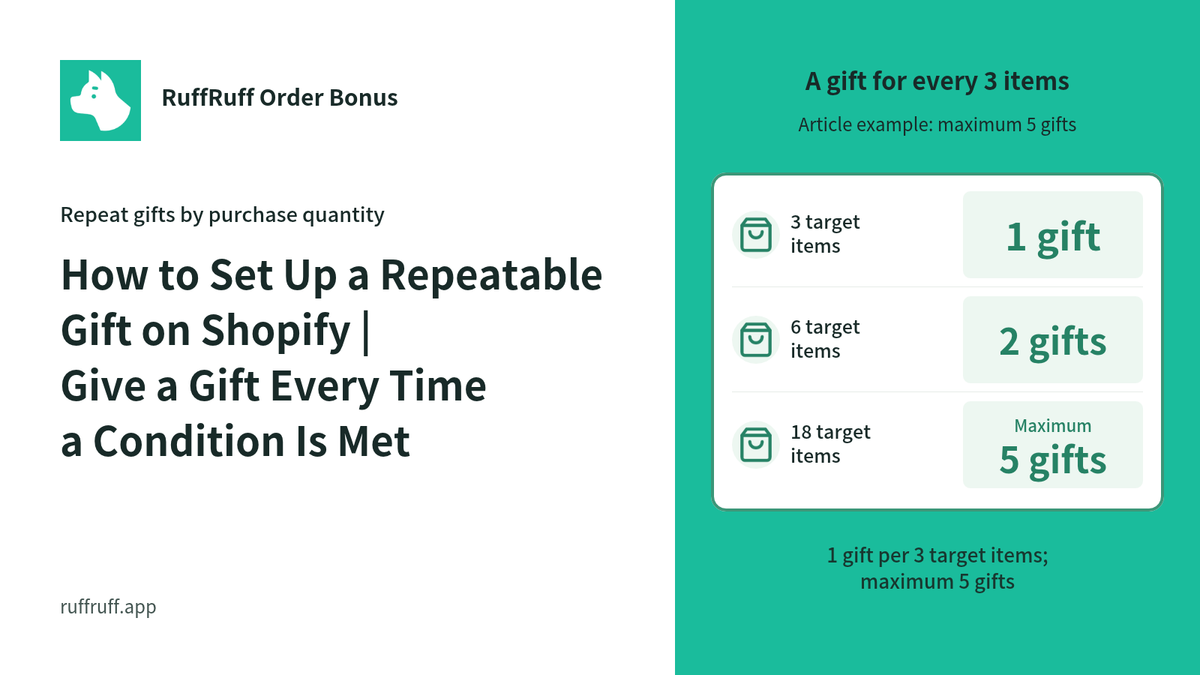
With the method introduced in this article, customers get 1 gift product for every 3 units of the target product they purchase. You can also cap the maximum number of gifts given, e.g. at 5.

For example, depending on the quantity of the target product in the cart, gift products are added as follows:

  • Buy 3 → 1 gift
  • Buy 6 → 2 gifts
  • Buy 9 → 3 gifts
  • Buy 12 → 4 gifts
  • Buy 15 → 5 gifts
  • Buy 18 → 5 gifts (capped at a maximum of 5)
  • Buy 21 → 5 gifts (capped at a maximum of 5)

The page below is a demo product configured the same way. Please check the actual behavior.

[Demo] A Gift Every Time You Meet the Condition | Repeatable Gift

Before You Start: Set Up the App

In this article, we'll show you how to use the Shopify app "RuffRuff Order Bonus" to distribute a free gift. If you haven't installed RuffRuff Order Bonus yet, please install it first.

Step 1: Enable the Embedded App

Click 'Enable app in theme' from the setup guide on the app's Home page

(1) From the setup guide on the app's Home page, click "Enable app in theme"

(2) Select the Shopify theme you want to add the app to from the dropdown

(3) Click "Enable app"

Change the design and text of the gift widget

(4) Enable "RuffRuff Order Bonus" on the left side of the theme editor

(5) Change the design and text of the widget

(6) Click "Save" at the top right of the screen

Step 2: Create a Gift Campaign

Click 'Create campaign' from the gift campaigns list page

(1) Click "Gifts" from the app's left-hand menu

(2) Click "Create campaign" from the gift campaigns list page

Example of the campaign overview settings

(3) Enter any name for the campaign

This is the name used to manage the gift campaign within the app.

(4) Set the period you want to run the campaign for in the active dates

Example of setting the eligibility conditions

(5) In the eligibility conditions, add a "Cart item quantity" condition

(6) Configure the following for the cart item quantity condition

  • Select "Is greater than or equal to" and enter 3
  • Select "Specific products" and choose the target product
Example of the gift settings

(7) Configure the gift product in the gift settings

  • Select "Repeatable gift"
  • Gift product name: enter any name
  • Component product: set the product and quantity to give away

(8) Configure the repeat basis

  • Select item quantity and enter 3
  • Select specific products and set the target product
  • Check "Exclude gift products"

(9) Enter "5" for the maximum gift quantity

Example of the display settings

(10) Enable "Show in widget" in the display settings

(11) Enter the campaign title and campaign description

Example of the validation settings

(12) Check the validations you need in the validation settings

Change the alert message if needed.

(13) Click "Save"

Step 3: Activate the Gift Campaign

The gift campaign activated

(1) Open the campaign you created in Step 2

(2) Click "Activate"

That's all there is to the setup.

In Closing

In this article, we introduced how to use the Shopify app "RuffRuff Order Bonus" to repeatedly give away a gift based on how many units of the target product a customer purchases.

Using this setup gives customers the motivation of "if I buy just one more, I get another gift," which can encourage bulk purchases and raise average order value (AOV).

The setup itself is done entirely from the app's admin dashboard with no code, so please consider incorporating it into your next campaign.

Shopify ✕ Discount

View all

How to Set Up Discounts on Subscription Products by Membership Rank in Shopify

Learn how to vary subscription prices by membership rank using Shopify Subscription. Using the RuffRuff Order Bonus app, this guide walks through — with screenshots — how to automatically apply a t...

【2026年最新】Shopifyディスカウント施策17選|無料の割引機能からアプリまで、売上UPとリピート促進を実現

[2026 Latest] 17 Shopify Discount Strategies | From Free Discount Features to Apps — Boost Sales and Drive Repeat Purchases

The complete guide to Shopify discount strategies. From free built-in features to advanced apps, this article covers 17 strategies that boost sales and drive repeat purchases at the same time. Expl...

How to Set Up Volume Discounts on Shopify | Simple Bulk-Purchase Discount Settings

This article explains how to set up volume discounts (bulk-purchase discounts) on Shopify using the easy-to-configure Shopify app "RuffRuff Order Bonus."

How to Set Up Tiered Shipping Discounts Based on Cart Quantity in Shopify | Free Shipping or Half-Price Shipping Based on Item Count

This article clearly explains, step by step, how to use the Shopify app "RuffRuff Order Bonus" — which is easy to use with simple settings — to set up half-price or free shipping when customers pur...

How to Set Discount Rates by Membership Rank in Shopify | Discounts Using Customer Tags

Learn how to set up membership-rank discounts using the simple, easy-to-configure Shopify app "RuffRuff Order Bonus." This guide walks through the setup steps in detail for applying tiered discount...

How to Offer Free Shipping Exclusively for VIP Members on Shopify | Simple Setup for Free Shipping When Customers Have the VIP Customer Tag

Boost customer loyalty by offering free shipping exclusively to VIP members! This article gives a beginner-friendly explanation of how to set up shipping discounts using customer tags with the easy...

Shopify ✕ Pre-order

View all
Shopifyで期間限定セールを実施する3つの方法 - 純正機能からアプリ活用まで

Shopify Limited-Time Sale Guide: Comparing and Explaining 3 Methods

A thorough guide to the three ways to run a limited-time sale on Shopify. Compares the built-in feature, manual setup, and dedicated apps, along with the pros and cons of each and how to use RuffR...

ShopifyでVIP会員限定販売を実装|RuffRuffアプリで完全ガイド

Implementing VIP Member-Only Sales on Shopify | The Complete Guide with RuffRuff Apps

A detailed guide to implementing VIP member-only sales on Shopify. A complete step-by-step setup guide using the RuffRuff Order Limits and RuffRuff Pre Order apps. Boost customer loyalty and increa...

Shopifyアプリ「RuffRuff 予約販売」のカウントダウンタイマー機能の使い方・仕様

How to Use and Specifications of the Countdown Timer Feature in the Shopify App "RuffRuff Pre Order"

Explains the basic steps for installing the "Countdown Timer" feature of RuffRuff Pre Order on the product page. Assuming an Online Store 2.0 compatible theme, this briefly summarizes the key point...

【Shopify】LINE会員向けに限定販売を実施する方法|CRM PLUS on LINEとRuffRuff 予約販売を活用

[Shopify] How to Offer Exclusive Sales for LINE Members | Using CRM PLUS on LINE × RuffRuff Pre Order

Explains how to combine CRM PLUS on LINE with RuffRuff Pre Order to offer products exclusively to LINE-linked members and sell at discounted prices. This article introduces, step by step, effective...

【Shopify】LINE連携会員限定販売を実施する方法|Lipify × RuffRuff 予約販売の活用例

[Shopify] How to Run Exclusive Sales for LINE-Linked Members | A Use Case of Lipify × RuffRuff Pre Order

This article explains how to sell products exclusively to LINE-linked members on Shopify. It introduces recommended Shopify apps and shares example settings for exclusive sales and promotions for L...

ShopifyでVIP会員限定で先行販売|発売予告→先行販売→通常販売の3段階設定

Early Access Exclusively for VIP Members on Shopify | 3-Stage Setup: Coming Soon → Early Access → Regular Sale

A detailed explanation of how to run early access exclusively for VIP members on Shopify. Using the RuffRuff Pre Order app, this article introduces step by step how to implement effective member-ex...

Shopify ✕ Order limits

View all
【2026年最新】Shopify購入制限アプリ9選を徹底比較!機能・料金・日本語対応で比較

[2026 Latest] A Thorough Comparison of 9 Shopify Purchase Limiting Apps! Comparing Features, Pricing, and Japanese Language Support

A thorough 2026 comparison of 9 must-have order limiting apps for Shopify stores! From quantity, price, and selling period limits to fraud prevention, find the best app for your store based on feat...

Shopifyで複雑な条件(都道府県・重量・金額の組み合わせ)で配送方法や配送料を出し分ける方法

How to Differentiate Shipping Methods and Rates in Shopify for Complex Conditions (Combinations of Prefecture, Weight, and Price)

Explains how to set up complex shipping conditions in Shopify. Introduces the concrete steps for combining prefecture, product weight, and purchase amount to differentiate Standard Shipping and Nek...

【2025年最新】Shopifyで金額制限|おすすめ購入制限アプリも紹介

[2026 Latest] Price Limits on Shopify | Recommended Order Limits Apps Included

Learn how to set price limits on Shopify. Using RuffRuff Order Limits, this article explains in detail how to set a price limit per order, along with the steps and various applications of price lim...

【2026最新】Shopifyで同梱制御の実現方法|同梱制限に役立つShopifyアプリと設定手順も解説

[2026 Latest] How to Implement Bundle Control in Shopify | Also Covering Helpful Shopify Apps and Setup Steps for Bundle Restrictions

A thorough explanation of how to set up bundle control in Shopify! We introduce recommended apps for handling various shipping conditions, along with the steps for setting up effective bundle restr...

Shopifyで単品購入不可の設定を実施する方法|セットでないと購入不可

[2026 Latest] How to Disable Single-Item Purchases on Shopify

This article explains how to prevent a specific product from being purchased individually on Shopify. We introduce in detail the steps for setting up bundle restrictions with RuffRuff Order Limits,...

【2026最新】Shopifyで個数制限の実施方法!数量を基準に購入制限

[2026 Latest] How to Implement Quantity Limits on Shopify! Restrict Purchases Based on Quantity

Learn how to set up quantity limits on your Shopify store. Using RuffRuff Order Limits, this article provides beginner-friendly steps for easily managing quantity limits. It delivers information to...

Shopify × Sales Period Settings

View all
Shopifyで期間限定販売を実施する方法|販売期間設定アプリも紹介

[Updated for 2026] How to Run Limited-Time Sales on Shopify | Selling Period Setting Apps Compared

A detailed guide to setting up limited-time sales on Shopify, plus our recommended apps. Learn the strategies for boosting sales in a short period of time!

【2026最新】Shopifyで発売予告を実施する方法|発売予告アプリも紹介

[Updated for 2026] How to Run Release Announcements on Shopify | Recommended Apps

Learn how to run release announcements on Shopify and which apps to use. We explain concrete techniques and setup methods to build customer anticipation and boost sales on launch day, along with ti...

Shopifyアプリ「RuffRuff 販売期間」のカウントダウンタイマー機能の使い方・仕様

How to Use the Countdown Timer Feature in the Shopify App "RuffRuff Selling Periods": Setup Guide & Specifications

Learn the basic setup and usage of the RuffRuff Selling Periods countdown timer. Discover how showing the remaining time can create urgency and boost your conversion rate.

Shopify ✕ Gift

View all
Shopifyで繰り返しギフトを実現する方法|条件達成ごとにギフト商品を配布

How to Set Up a Repeatable Gift on Shopify | Give a Gift Every Time a Condition Is Met

A guide to setting up a repeatable gift on Shopify, like "1 free gift for every 3 purchased." With the Shopify app "RuffRuff Order Bonus," you can implement automatic gifts based on purchase quanti...

Shopifyで選べるギフトを実現する方法|条件達成でお客様が好みの商品を選択

How to Offer a Choice Gift on Shopify | Let Customers Pick Their Favorite Product When a Condition Is Met

A guide to setting up a "choice gift" on Shopify, letting customers pick their favorite gift when a condition is met. Learn how to use the Shopify app "RuffRuff Order Bonus" to build a novelty camp...

Shopifyで条件達成時にデジタル商品を無料プレゼントする方法

How to Give Away a Free Digital Product on Shopify When a Condition Is Met

A guide to giving away digital products as a gift on Shopify. Learn how to connect the "Digital Downloads" app with "RuffRuff Order Bonus" to automatically send buyers digital content, step by step.

How to Give VIP Customers a Free Gift on Shopify | Gift Distribution Based on Customer Tags

A detailed guide to automatically distributing a free gift to VIP customers based on a customer tag, using the RuffRuff Order Bonus Shopify app. Boost customer satisfaction and repeat purchase rate...

How to Distribute Sample Products on Shopify | Gift Distribution Based on Amount with RuffRuff Order Bonus

A guide to automatically distributing sample products on Shopify. Learn how to use the RuffRuff Order Bonus app to give away a sample product on orders of ¥10,000 or more, boosting average order va...

How to Give Away Free Gifts on Shopify | Gift Distribution Based on Quantity

A step-by-step guide with screenshots to automatically distribute free gifts on Shopify. Learn how to configure a 3-or-more quantity condition and enable your theme with the RuffRuff Order Bonus ap...

Shopify ✕ Blog

View all
Shopifyタグ一覧・絞り込み機能の導入方法|3つの実装アプローチを解説

How to Implement Tag Lists and Tag Filtering in Shopify

A complete guide to Shopify's tag feature. Implement tag list display and filtering using three methods: themes, apps, or code. We also cover setup and customization steps for RuffRuff Product & Bl...

【2025】Shopifyのタグ一覧アプリを徹底比較|表示位置やタグ絞り込み(タグフィルター)機能など

Comparing 3 Shopify Tag List Apps | Pricing, Features, and Setup Explained

Compare the Shopify tag list apps "RuffRuff Product & Blog Tags," "Simple Blog Tag Filter," and "Quick Tag Search." We break down pricing, features, and setup to help you choose the best app for yo...

Shopifyのブログ記事に目次を自動表示|3つの方法と無料アプリの設定手順

3 Ways to Automatically Display a Table of Contents in Shopify Blog Posts | Free App Setup Guide

Learn three methods to display a table of contents in Shopify blog posts (source code customization, app usage, theme usage). Step-by-step instructions focus on setup using the free app RuffRuff Ta...

Shopifyブログの著者プロフィール表示方法【3つの選択肢を比較】

How to Display Author Profiles on Shopify Blog Posts [Comparing 3 Options]

A thorough comparison of three ways to display author profile information on Shopify blog posts. We explain the features, advantages, and disadvantages of the standard feature, source code customiz...

How to Display Shopify Tag Lists by Language | Show Japanese and English Tags Separately Using an App

Learn how to display tag lists on Shopify collection pages by language. This guide provides step-by-step instructions with screenshots on using the RuffRuff Product & Blog Tags app (Regular Pla...